Definition for WCAG 2.1 success criterion 1.3.4
1.3.4 Identify Common Purpose: The meaning of each input field collecting information about the user can be programmatically determined when:
- The input field has a meaning that maps to the HTML 5.2 Autofill field names; and
- The content is implemented using technologies with support for identifying the expected meaning for form input data.
Note: At the time of writing (16th March 2018), there is a discussion on the WCAG working group for moving this success criterion to guideline 3.3.
The intent of this success criterion is to allow more support for diverse user preferences and needs by introducing the capacity for enhanced personalization. This success criterion will enable support for personalization, such as familiar terms and symbols that are needed for users with cognitive disabilities to be able to use the web. If a user agent, either the browser or Assistive Technology, knows what a control does then it can potentially provide the extra support required.
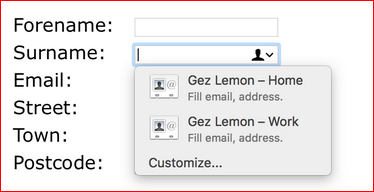
For example, browsers sometimes have features for helping users fill in forms, such as pre-filling the user's address based on previous user input. The autocomplete content attribute can be used to hint to the browser how to provide help or populate fields.
The following screenshot shows the browser offering suggestions to autofill form controls.
Microformats are small patterns of markup that represent commonly published content, such as events, locations, recipes, resumes, and so on. The patterns are programmatically identifiable, so assistive technologies can make use of the semantics they expose.
Ensuring content is programmatically identifiable, such as using valid autocomplete values or using known semantic design patterns, makes personalization possible. For example, a user could load a set of symbols appropriate for them so the icons are simple and familiar.
Testing success criterion 1.3.4
Input into spreadsheet
- Fail
- Some or all input fields do not have autofill values, or the values provided are incorrect.
- Pass
- All input fields that map to autofill values have correct values for the data type.
- N/A
- The sample does not have interface elements that map to autofill values.
How to test
- Review all form controls that map to the HTML 5.2 Autofill field names, and ensure that the correct value is provided.
Input into spreadsheet
- Fail
- Semantics for known design-patterns are provided, but inappropriate.
- Pass
- Semantics for known design-patterns are provided correctly.
- N/A
- The sample does not contain data appropriate for known semantic design patterns.
How to test
- Identify sections of commonly used content, such as contact information.
- Review the semantics of the sections to see if they expose known design-patterns, such as
h-card,h-event, etc.