Definition for WCAG 2.1 success criterion 1.4.12
1.4.12 Text Spacing: In content implemented using markup languages that support the following text style properties, no loss of content or functionality occurs by setting all of the following and by changing no other style property:
- Line height (line spacing) to at least 1.5 times the font size;
- Spacing following paragraphs to at least 2 times the font size;
- Letter spacing (tracking) to at least 0.12 times the font size;
- Word spacing to at least 0.16 times the font size.
Exception: Human languages and scripts which do not make use of one or more of these text style properties in written text can conform using only the properties that are used.
The intent of this success criterion is to help ensure that people with disabilities who override spacing can read text. It allows for a buffer. Increased spacing between lines, words, and letters has benefits for people who override author settings via user stylesheet, bookmarklet, extension, or application. They may need to change font family (e.g. to a wider one) than the author has set to effectively read text. They may increase spacing between lines, words, and letters to effectively read text. Line spacing also helps with tracking. Tracking is following along lines of text, including getting from the end of one line to the beginning of the next line.
People with low vision may increase space between lines, words, and letters are able to read text. People with dyslexia may increase space between lines, words, and letters to increase reading speed.
Note: This success criterion doesn't require content to meet the specified metrics, but that the content has the ability to be set to those metrics without loss of content or functionality.
Testing success criterion 1.4.12
Input into spreadsheet
- Fail
- Some loss of essential content or functionality occurs when user-defined styles are applied, or the styles are not honored.
- Pass
- No loss of essential content or functionality occurs when user-defined styles are applied.
How to test
This test procedure requires applying a user-defined styles with the following rules:
* {
  line-height: 1.5 !important;
 }
p {
  margin-bottom: 2em !important;
}
* {
  letter-spacing: 0.12em !important;
}
* {
  word-spacing: 0.16em !important;
}
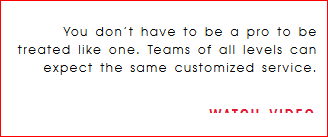
This can be implemented as a bookmarklet, a user-defined style sheet, or using a plugin, such as the Stylish Plugin. The following screenshot shows a link to "Watch video" that has been truncated after activating the user-defined styles.
- Set the zoom level to 100%.
- Apply user-defined styles.
-
Ensure no loss of essential content or functionality occurs. In particular:
- Ensure that text isn't truncated as a result of applying the user-defined style sheet.
- Ensure that text does not overlap as a result of applying the user-defined style sheet.
- Ensure the styles in the user-defined style sheet are applied to the text.